Give Your Codex a Background That Breathes
A desktop pet drops a little animated companion onto your screen; a skin lays a background image across the whole Codex window. The two don't clash—a pet busy in the corner, paired with a background that matches your mood, makes writing code a lot less dull. This page covers the second half: how to reskin Codex desktop, and the 8 original backgrounds we've made for you to take.
Can You Reskin Codex?
The official Codex desktop app only ships limited light/dark and accent-color settings—there's no "swap the whole window background" switch. A popular open-source project fills that gap: Codex Dream Skin (MIT license, macOS and Windows). Its pitch is to "give Codex desktop a face that breathes."
The nice part is how restrained it is: it doesn't touch the official installer, app.asar, or the code signature. Here's how it works—Codex desktop is an Electron app, so the tool launches the official Codex with a debugging port, then injects a layer of CSS and a background image over the local loopback (127.0.0.1). Every native control (sidebar, input box, suggestion cards, project picker) stays clickable and usable; the decorative layer just sits underneath and doesn't intercept the mouse. When you want the official look back, one command restores it.
How to Install
Below is the official flow from the project's README (we're only paraphrasing—defer to the repo for specifics):
macOS:After downloading the repo, double-click Install Codex Dream Skin.command in the macos/ folder and follow the prompts.
Windows:In windows/scripts/, first run install-dream-skin.ps1 (sets up the base colors and a shortcut), then run start-dream-skin.ps1 to launch Codex with the skin; to undo it, run restore-dream-skin.ps1.
Preview: 8 Custom Skins Starring Our Pets
The 8 images below are mockups showing our backgrounds applied through the skin tool (drawn by this site, not official client screenshots). Each set stars one of our desktop pets—themed sidebar projects and task lists, a handwritten signature banner, a custom seal with a unique ID, and a polaroid tucked into the bottom-right corner. In the real tool, the sidebar, suggestion cards, and input box all stay natively interactive. Click any image for the full view.


Like the star of a set? The gallery link sits right next to the skin name—both the pet and the background are free to download, and together they make the full look.
Official Showcase (From the Project Repo)
This set is the real-client showcase from the official Codex Dream Skin repository, and it gives you a better feel for the tool's ceiling—from a pink custom build and a God of Wealth office edition to a Hatsune Miku theme, the whole window mood changes completely while the sidebar, suggestion cards, and input box remain native controls. The images are embedded straight from the repo; click any one for the full view:






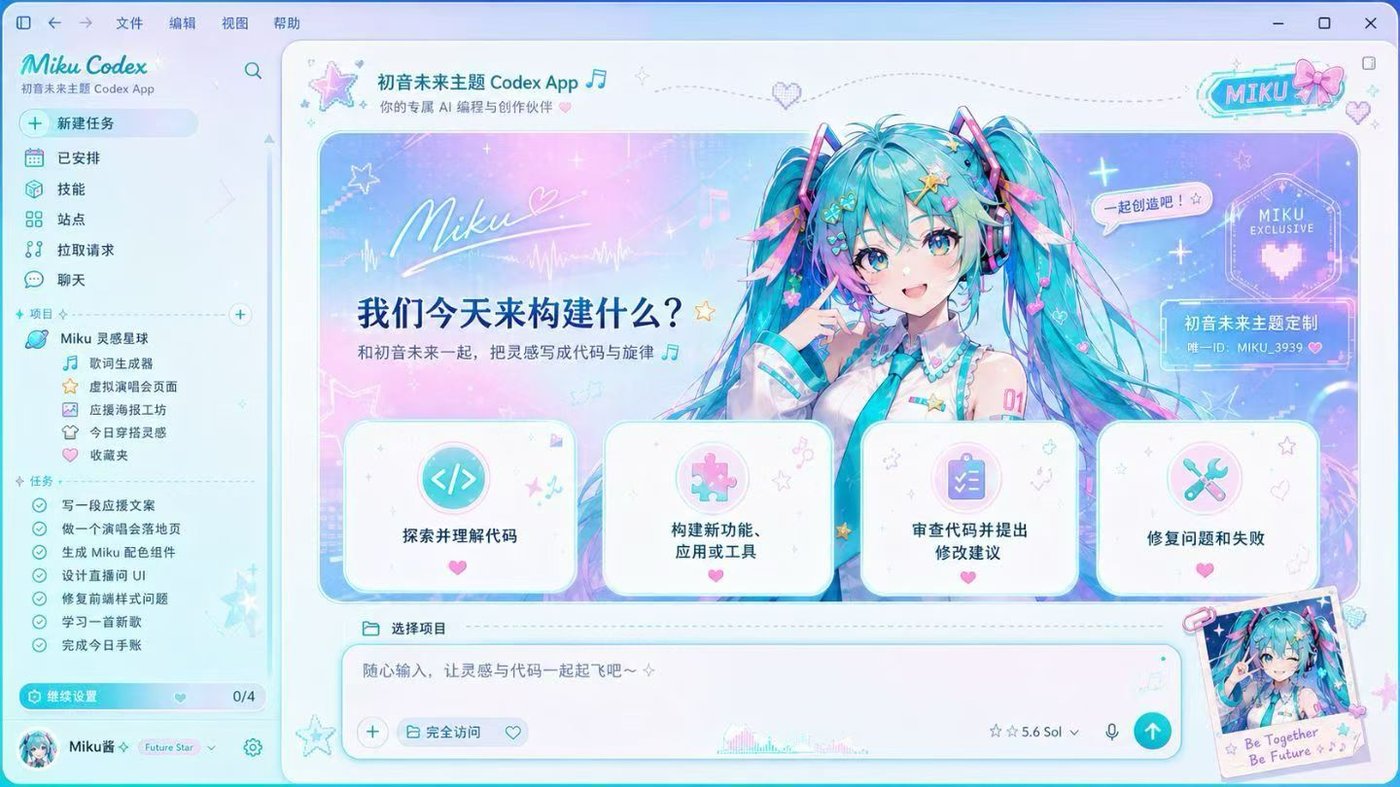

Copyright in the showcase images above, along with any likeness and character rights within them, belongs to the original rights holders. This site cites them for reference only and does not offer downloads; if a rights holder objects, we will remove them immediately upon contact. For backgrounds you can use freely, see our original gallery below.
How to Use (Get These Backgrounds into Your Codex)
- Download a background: click any image in the gallery below and save the original (2560×1600, already prepared to the tool's recommended spec: over 2000px wide, a clean left side, and far under the 16MB limit);
- Install the skin tool: download it from the Codex Dream Skin repo; on macOS run
macos/scripts/install-dream-skin-macos.sh(it creates four desktop shortcuts: launch, customize, and restore); - Swap the image in (macOS): double-click
Codex Dream Skin - Customize.commandon your desktop and pick the downloaded background in Finder, or point to it from the command line:~/.codex/codex-dream-skin-studio/scripts/customize-theme-macos.sh --image ~/Downloads/deep-ocean.webp --name "Deep Ocean" - Launch: double-click
Codex Dream Skin.commandand Codex opens with your new background; to undo it anytime, double-clickRestore.commandand the official look is back in one step.
A note for Windows users: the tool's Windows version can currently only apply its built-in themes and doesn't yet support user-supplied background images (the capability matrix says so explicitly). To enjoy these backgrounds on Windows for now, set one as your system wallpaper and keep an eye on the repo for updates.
8 Original Backgrounds, Free to Take
A skin tool needs a background image. The 8 below are original gradient backgrounds generated procedurally on this site—2560×1600, clean compositions that won't fight your foreground text, and completely royalty-free. Download and use them however you like, no attribution needed even for commercial use. Click an image to download the original.


Tip: the dark ones (Midnight Code, Deep Ocean, Mono Slate) are easier on the eyes over long sessions and pair better with dark themes; the light ones (Aurora Pink, Mint Fresh, Lavender Haze) feel airier and livelier. Pick one you like, add a pet, and your Codex is new for the day.
Want a One-of-a-Kind Background? Generate Your Own
Our 8 backgrounds stick to a clean, stay-out-of-the-way style. If you want something with more presence—a cyberpunk city at night, a watercolor garden, a swirl of nebulae—you can generate it with AI: on PixPix, describe the scene in one sentence (say, "a soft gradient illustration of the sea at sunset, landscape composition, clean open space on the left"), pick a landscape ratio, save the result, and install it the same way as above. It's a platform that brings together 24+ leading image and video models, so a desktop background takes well under a minute. Two things to remember when generating: landscape orientation and a clean left side—that's the skin tool's recommended spec.
还想要更多?去 4K 免费壁纸站随便挑
画面感更强的背景,去 4K 免费壁纸站 wallpaper.news 挑:几万张 4K 壁纸免费下载,分辨率天然满足换肤工具「宽度 ≥2000px」的要求。下面这一组是我们按「构图干净、不抢前景」标准替你选好的——极简、禅意、暗色系都有,点进去下 4K 原图即可:


选图小抄:跟着「极简」「暗色」「纹理」这几个分类找,基本不会踩雷;构图太满的图当 Codex 背景会跟文字打架。下载 4K 原图后,按上面「如何使用」的步骤换上就行。
Skin + Pet, Set Up Together
The background sets the tone, the pet adds the spark—that's the combo we recommend most. Choose a background whose light/dark matches your current theme (a dark background with a dark theme is easier on the eyes), then pick a pet with matching vibes: for calm, go with Capybara or the Lounging Capybara; for a techy edge, go with the Cyber Cat or BitBit. How to install a pet and how it works are all in the user guide.